
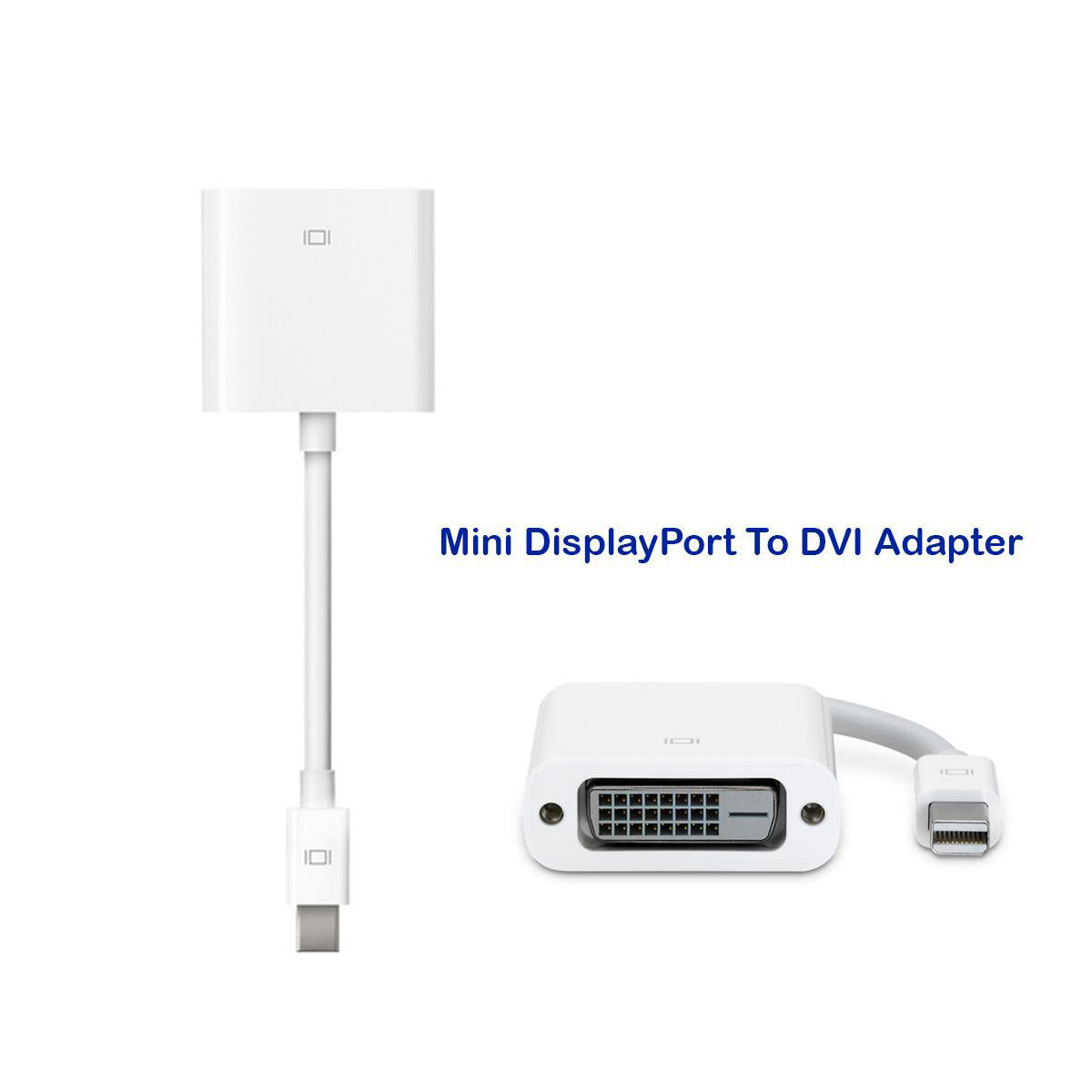
Apple Mini DisplayPort To DVI Adapter

Sale price59,000 Ks

Pickup currently unavailable at iSure Mandalay

Apple Mini DisplayPort To DVI Adapter - XtraSure | Apple Authorized Reseller in Myanmar

Apple Mini DisplayPort To DVI Adapter

iSure Mandalay

Pickup currently unavailable

iSure
G(3/4), 78th Street, Between 30th & 31st Street
Mandalay
Myanmar (Burma)

+959880441122

XtraSure 35 Street Mandalay

Pickup available, Usually ready in 24 hours

35th St between 69th St and 70th St, Chan Aye Thar Zan Township
Mandalay 05021
Myanmar (Burma)

+959880441122

Dyson by iSure Junction City

Pickup currently unavailable

01-C002, Ground Floor, Junction City, Corner of Bogyoke Aung San Road and Shwedagon Pagoda Road, Pabedan Township, Yangon.
Yangon 11141
Myanmar (Burma)

+959765421972

iSure Times City

Pickup currently unavailable

Kyun Taw Road
Room No. A209 (level 2), Times Mall, Times City Complex
Yangon
Myanmar (Burma)

+959880441122

XtraSure Junction City Branch

Pickup currently unavailable

01-007, Ground Floor, Junction City, Corner of Bogyoke Aung San Road and Shwedagon Pagoda Road, Pabedan Township
Yangon 11141
Myanmar (Burma)

+959880441122

XtraSure The Central Branch

Pickup currently unavailable

XtraSure The Central
Shop (12), The Central Boulevard Yangon, Corner of Kabar Aye Pagoda Road, & Kanbae Rd
ရန်ကုန် 11211
Myanmar (Burma)

+959880441122

XtraSure Times City Branch

Pickup currently unavailable

XtraSure Times City
Room No. A103-A104, Building 2A, Times Mall
ရန်ကုန် 11211
Myanmar (Burma)

+959880441122

XtraSure Waizayantar Branch

Pickup currently unavailable

Waizayantar Road, 16/2 Qtr, Thingangyun Tsp, Yangon.
No(206/207)
ရန်ကုန် 11071
Myanmar (Burma)

+959880441122
Only 1 unit left

How to get (or) convert to eSIM

  1. ၁။ မိမိ၏ မှတ်ပုံတင် (သို့မဟုတ်) နိုင်ငံကူးလက်မှတ် (Passport)ကိုယူဆောင်၍ မိမိအသုံးပြုသော SIM Card အလျှောက် သက်ဆိုင်ရာ MPT/U9/Atom ရုံးခွဲများသို့ သွားပါ။
  2. ၂။ eSIM အဖြစ် ပြောင်းလဲလိုကြောင်း ပြောပါ။
  3. ၃။ အချက်အလက်စစ်ဆေးရန်အတွက် မှတ်ပုံတင်/Passport ပြသပါ။
  4. ၄။ ဆိုင်မှ eSIM အတွက် QR Code တစ်ခု ထုတ်ပေးပါမည်။
  5. ၅။ ဖုန်းထဲတွင် QR Code ကို Scan ဖတ်၍ ထည့်သွင်းပါ -
    • iPhone: Settings → Cellular → Add Cellular Plan
    • Android: Settings → Network & Internet → Mobile Network → Add Carrier

eSIM လျှောက်ရာတွင် သိထားသင့်သောအချက်များ

  • မှတ်ပုံတင်: SIM ကတ် မှတ်ပုံတင်ရန်အတွက် မူရင်းမှတ်ပုံတင် သို့မဟုတ် Passport မဖြစ်မနေ ယူဆောင်သွားပါ။
  • SIM အဟောင်း : eSIM သို့ ပြောင်းပြီးပါက မူလ SIM ကတ်အဟောင်းသည် အလိုအလျောက် ပျက်သွားပါမည်။
  • QR Code သိမ်းဆည်းရန်: QR Code ကို သေချာသိမ်းထားရန် လိုအပ်ပါသည်။ ဖုန်းလဲသည့်အခါ သို့မဟုတ် ပြန်လည်ထည့်သွင်းလိုသည့်အခါတွင် လိုအပ်နိုင်ပါသည်။
  • Internet: eSIM အသက်သွင်းချိန်တွင် ဖုန်း၌ Wi-Fi သို့မဟုတ် အင်တာနက် ချိတ်ဆက်ထားရန် လိုအပ်ပါသည်။
  • စစ်ဆေးရန်: မိမိဖုန်းသည် eSIM Support လုပ်/မလုပ် သိရှိရန် *#06# ကိုနှိပ်၍ EID Number ပါ/မပါ စစ်ဆေးနိုင်ပါသည်။

Learn More

🛡️ XtraSure Order Policy

လူကြီးမင်း၏ Order များကို ရုံးချိန်အတွင်း ဖုန်းဖြင့်ဆက်သွယ်ကာ အတည်ပြု (Confirmation) ပြုလုပ်ပေးပါသည်။

ဖုန်းဖြင့်ဆက်သွယ်မရရှိပါက Order ကိုဆက်လက်မထိန်းသိမ်းနိုင်သဖြင့် အလိုအလျောက်ပယ်ဖျက်သွားမည်ဖြစ်ကြောင်း အသိပေးအပ်ပါသည်။

Order ကိုအတည်ပြုပြီးပါက နောက်တနေ့ နေ့လည် ၁၂ နာရီအထိသာ Stock ကိုထိန်းသိမ်းထားပေးမည်ဖြစ်ပါသည်။

ဈေးနှုန်းအတက်အကျများ မကြာခဏဖြစ်ပေါ်နေသည့်အတွက် Order အတည်ပြုပြီး ၃ နာရီအတွင်း ငွေပေးချေမှုပြုလုပ်ပေးရန် မေတ္တာရပ်ခံအပ်ပါသည်။

သတ်မှတ်ချိန်အတွင်း ငွေပေးချေမှု မပြုလုပ်နိုင်ပါက လက်ရှိဈေးနှုန်းအတက်အကျအတိုင်း ပြန်လည်တွက်ချက်ပေးမည်ဖြစ်ပါသည်။

Sure Benefits Points

ဝယ်ယူလိုက်သော Product တွင် Sure Benefit Point ခံစားခွင့် ပါဝင်ပါသည်။ (1 Point = 1 MMK)

Website မှ ဝယ်ယူသူများအနေဖြင့် ရရှိမည့် Points များကို (၂၄) နာရီအတွင်း ထည့်သွင်းပေးမည်ဖြစ်၍ ဝယ်ယူထားသည့် ဖုန်းနံပါတ်ဖြင့် Sure Benefits Account ဖွင့်ထားပေးပါရန် မေတ္တာရပ်ခံအပ်ပါသည်။

Sure Benefits App တွင် Register ပြီး ရရှိထားသော Shopping Points များကို XtraSure & iSure ဆိုင်ခွဲများတွင် ပစ္စည်းများနှင့် လဲလှယ်ဝယ်ယူနိုင်ပါသည်။ ထို့အပြင် Points များ စုဆောင်း၍ Club Level မြှင့်တင်ကာ Level အလိုက် XtraSure, iSure Exclusive Promotions များနှင့် မိတ်ဖက်လုပ်ငန်းများ၏ အထူး အကျိုးခံစားခွင့်များကိုပါ ရရှိခံစားနိုင်မည် ဖြစ်ပါသည်။

Tier Level Point Rate (100 Ks) Club Scores Needed Redeem Daily Limit
Classic 1 Point - 200,000 Points
Exclusive 1.2 Points 150,000 Scores 400,000 Points
VSP 1.5 Points 500,000 Scores 700,000 Points
VVSP 1.7 Points 1,000,000 Scores Unlimited
XSP - 3,000,000 Scores Unlimited
Order via Messenger
1 Year Warranty

Overview

Every Mac with a Mini DisplayPort allows you to connect an external display or projector using an adapter. You can use an external display as your main workspace or to extend your desktop, or you can work in mirrored mode with a projector so you can view what your audience sees. Use the Mini DisplayPort to DVI Adapter to connect an advanced digital monitor, such as the 20- or 23-inch Apple Cinema Display, that includes a DVI connector. Review the documentation or check with the manufacturer of your monitor to make sure you're choosing the right adapter.

System Requirements

Compatible with Mac computers with Mini DisplayPort and Thunderbolt ports. Compatibility

Mac Models

  • MacBook Air (13-inch, Early 2015 - 2017)
  • MacBook Air (11-inch, Early 2015)
  • MacBook Pro (Retina, 13-inch, Late 2012 - 2015)
  • MacBook Pro (Retina, 15‑inch, Mid 2012 ‑ 2015)
  • iMac (Retina 4K, 21.5-inch, Late 2015)
  • iMac (Retina 5K, 27-inch, Late 2014 - 2015)
  • Mac mini (Late 2014)
  • Mac Pro (Late 2013)
Product options
Title: Default Title
Product vendor
Apple
Product type
Power and Cables
Product tags
Apple Original Accessories, Power Adapters