
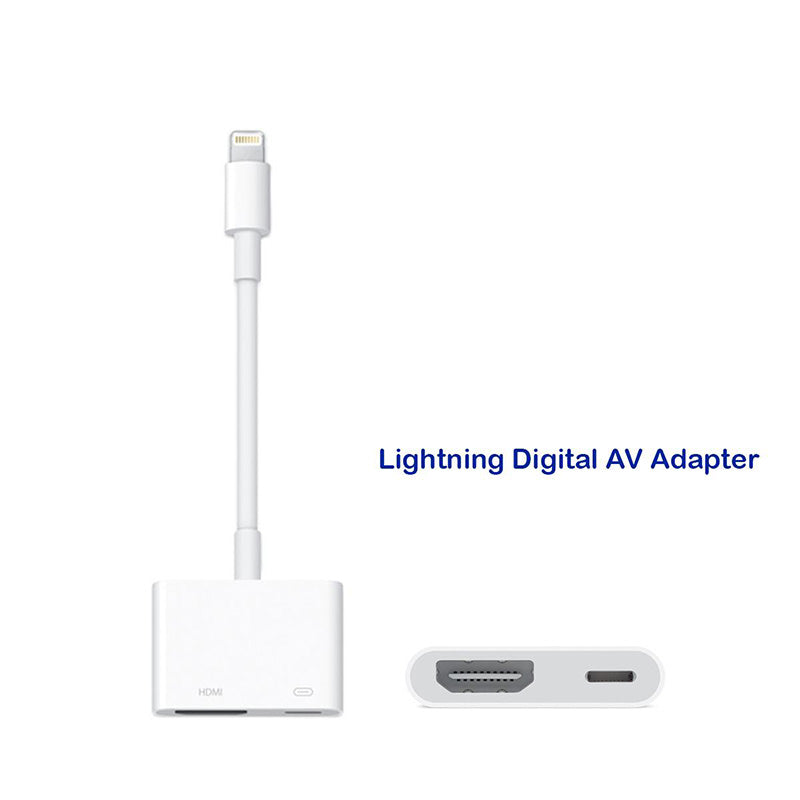
Apple Lightning Digital AV Adapter

Sale price179,000 Ks

Pickup currently unavailable at iSure Mandalay

Apple Lightning Digital AV Adapter - XtraSure | Apple Authorized Reseller in Myanmar

Apple Lightning Digital AV Adapter

iSure Mandalay

Pickup currently unavailable

iSure
G(3/4), 78th Street, Between 30th & 31st Street
Mandalay
Myanmar (Burma)

+959880441122

XtraSure 35 Street Mandalay

Pickup currently unavailable

35th St between 69th St and 70th St, Chan Aye Thar Zan Township
Mandalay 05021
Myanmar (Burma)

+959880441122

iSure Times City

Pickup currently unavailable

Kyun Taw Road
Room No. A209 (level 2), Times Mall, Times City Complex
Yangon
Myanmar (Burma)

+959880441122

XtraSure Junction City Branch

Pickup currently unavailable

01-007, Ground Floor, Junction City, Corner of Bogyoke Aung San Road and Shwedagon Pagoda Road, Pabedan Township
Yangon 11141
Myanmar (Burma)

+959880441122

XtraSure The Central Branch

Pickup currently unavailable

XtraSure The Central
Shop (12), The Central Boulevard Yangon, Corner of Kabar Aye Pagoda Road, & Kanbae Rd
ရန်ကုန် 11211
Myanmar (Burma)

+959880441122

XtraSure Times City Branch

Pickup currently unavailable

XtraSure Times City
Room No. A103-A104, Building 2A, Times Mall
ရန်ကုန် 11211
Myanmar (Burma)

+959880441122

XtraSure Waizayantar Branch

Pickup currently unavailable

Waizayantar Road, 16/2 Qtr, Thingangyun Tsp, Yangon.
No(206/207)
ရန်ကုန် 11071
Myanmar (Burma)

+959880441122

How to get (or) convert to eSIM

  1. ၁။ မိမိ၏ မှတ်ပုံတင် (သို့မဟုတ်) နိုင်ငံကူးလက်မှတ် (Passport)ကိုယူဆောင်၍ မိမိအသုံးပြုသော SIM Card အလျှောက် သက်ဆိုင်ရာ MPT/U9/Atom ရုံးခွဲများသို့ သွားပါ။
  2. ၂။ eSIM အဖြစ် ပြောင်းလဲလိုကြောင်း ပြောပါ။
  3. ၃။ အချက်အလက်စစ်ဆေးရန်အတွက် မှတ်ပုံတင်/Passport ပြသပါ။ 
  4. ၄။ ဆိုင်မှ eSIM အတွက် QR Code တစ်ခု ထုတ်ပေးပါမည်။
  5. ၅။ ဖုန်းထဲတွင် QR Code ကို Scan ဖတ်၍ ထည့်သွင်းပါ -
    • iPhone: Settings → Cellular → Add Cellular Plan
    • Android: Settings → Network & Internet → Mobile Network → Add Carrier 

eSIM လျှောက်ရာတွင် သိထားသင့်သောအချက်များ

  • မှတ်ပုံတင်: SIM ကတ် မှတ်ပုံတင်ရန်အတွက် မူရင်းမှတ်ပုံတင် သို့မဟုတ် Passport မဖြစ်မနေ ယူဆောင်သွားပါ။
  • SIM အဟောင်း : eSIM သို့ ပြောင်းပြီးပါက မူလ SIM ကတ်အဟောင်းသည် အလိုအလျောက် ပျက်သွားပါမည်။
  • QR Code သိမ်းဆည်းရန်: QR Code ကို သေချာသိမ်းထားရန် လိုအပ်ပါသည်။ ဖုန်းလဲသည့်အခါ သို့မဟုတ် ပြန်လည်ထည့်သွင်းလိုသည့်အခါတွင် လိုအပ်နိုင်ပါသည်။
  • Internet: eSIM အသက်သွင်းချိန်တွင် ဖုန်း၌ Wi-Fi သို့မဟုတ် အင်တာနက် ချိတ်ဆက်ထားရန် လိုအပ်ပါသည်။
  • စစ်ဆေးရန်: မိမိဖုန်းသည် eSIM Support လုပ်/မလုပ် သိရှိရန် *#06# ကိုနှိပ်၍ EID Number ပါ/မပါ စစ်ဆေးနိုင်ပါသည်။

Learn More

🛡️ XtraSure Order Policy

လူကြီးမင်း၏ Order များကို ရုံးချိန်အတွင်း ဖုန်းဖြင့်ဆက်သွယ်ကာ အတည်ပြု (Confirmation) ပြုလုပ်ပေးပါသည်။

ဖုန်းဖြင့်ဆက်သွယ်မရရှိပါက Order ကိုဆက်လက်မထိန်းသိမ်းနိုင်သဖြင့် အလိုအလျောက်ပယ်ဖျက်သွားမည်ဖြစ်ကြောင်း အသိပေးအပ်ပါသည်။

Order ကိုအတည်ပြုပြီးပါက နောက်တနေ့ နေ့လည် ၁၂ နာရီအထိသာ Stock ကိုထိန်းသိမ်းထားပေးမည်ဖြစ်ပါသည်။

ဈေးနှုန်းအတက်အကျများ မကြာခဏဖြစ်ပေါ်နေသည့်အတွက် Order အတည်ပြုပြီး ၃ နာရီအတွင်း ငွေပေးချေမှုပြုလုပ်ပေးရန် မေတ္တာရပ်ခံအပ်ပါသည်။

သတ်မှတ်ချိန်အတွင်း ငွေပေးချေမှု မပြုလုပ်နိုင်ပါက လက်ရှိဈေးနှုန်းအတက်အကျအတိုင်း ပြန်လည်တွက်ချက်ပေးမည်ဖြစ်ပါသည်။

Order via Messenger
  • Apple Original Lightning Digital AV Adapter ဟာ သင့်ရဲ့ iPhone ၊ iPad နဲ့ iPod တွေမှာပါဝင်တဲ့ Lightning Connector ကို အသုံးပြုပြီး ချိတ်ဆက်အသုံးပြုရမှာဖြစ်ပါတယ်။
  • ကိုယ့် Apple Device မှာအသုံးပြုနေတဲ့ App ၊ Presentation ၊ Website ၊ Slideshow တွေကို HDMI Compatibleဖြစ်တဲ့ TV ၊ Display ၊ Projector တွေမှာ 1080p Full HD Resolution နဲ့ပြသနိုင်မှာဖြစ်ပါတယ်။
  • Lightning Digital AV Adapter ကို Apple Device မှာ ချိတ်ဆက်ပြီး HDMI Cable (သီးသန့်ဝယ်ယူနိုင်သည်) ကနေတစ်ဆင့် TV သို့မဟုတ် Projector နဲ့ ချိတ်ဆက်ရမှာဖြစ်ပါတယ်။
  • Apple Original Product ဖြစ်ပါတယ်။
  • 1 Year Apple Limited Warranty.
  • Use the Lightning Digital AV Adapter with your iPhone, iPad, or iPod with Lightning connector.
  • The Lightning Digital AV Adapter supports mirroring of what is displayed on your device screen — including apps, presentations, websites, slideshows, and more — to your HDMI-equipped TV, display, projector, or other compatible display in up to 1080p HD.
  • It also outputs video content — movies, TV shows, captured video — to your big screen in up to 1080p HD.
  • Simply attach the Lightning Digital AV Adapter to the Lightning connector on your device and then to your TV or projector via an HDMI cable (sold separately).
  • 1 Year Apple Limited Warranty
Product options
Title: Default Title
Product vendor
Apple
Product type
Power and Cables
Product tags
Apple Original Accessories, Power Adapters
Product collections
Accessories, Apple, Test